Monday, January 19, 2015

Technology and friendship

When I first started using Facebook, there would be great excitement whenever a connection to a long lost friend was reestablished. At that time, I accepted friend requests from close friends, acquaintances, remote relatives or even strangers. There wasn’t any filter whenever I shared my thoughts.

Overtime I realized despite the thousands of friends I had on Facebook, a great number of them was really strangers. Times and times again I found it inappropriate to discuss more personal matters openly. After some spring-cleaning, my friends are now people with whom I have had interactions, regardless how little. I figure that is the least I could do to keep my sanity on Facebook.

As social media became a part of my daily routine, I had a deeper understanding about friendship; not every good person we met could eventually become a closed friend. In his novel Demi-Gods and Semi-Devils (Tian Long Ba Bu), Louis Cha has a very vivid description of this exact predicament.

In this story, the only punishment of anyone who had committed the crime of betrayal to the boss was death. However, the boss could overrule the death penalty if he chose to cleanse the crime with his own blood. 

As the boss snatched away the knife from the accused when he tried to kill himself for his crime, the boss said, “I am like a cowboy and I do not like to hangout with people who are meticulous and calculative. I too like to drink and laughed loudly with friends. That is why although we work together, I usually choose to drink and make a lot of noise with the lower ranked members.  That is just how I am, and it does not mean that I have something against you. You never get drunk and are extremely careful in dealing with the gang business. This is a fine quality that I can never be better than you.”

Then he pierced the knife into his own shoulder to cleanse the crime of the accused.

In this story, Louis Cha pointed out that two great men may not be able to be close friends simply because of the differences in characters and belief, and not because someone else has committed some unspeakable sins.

And there are a great variety of people with different viewpoints and characters on my Facebook. Therefore, it could be challenging to discuss my viewpoints at times; and there have been unpleasant experiences where I offended people unknowingly.

To avoid such miscommunications, I chose not to say so much. Or I only share things that do not matter. Or I just come here to see my friend’s recent activities. And because of these reservations, a great platform on which we could build better friendship has deteriorated to something very skin-deep.

I am in the technology business. I once naively believed that technology could fix anything. I only understood after my 40th birthday that technology could not replace the warm feeling shared when having diner with my old folks, or the boisterous laughers cheered during drinking sessions with my buddies, or the creativity generated during brainstorming session with my partners. Physical contacts are still required to create fire.


In the Chinese character, we need to first have a heart before we can have a relationship. So in this new year, please give your loved ones a big bear hug.


January 18, 2015. Kuala Lumpur. 

說情

剛有臉書的時候,常常會因找到失聯的朋友而興奮不已。不論是深交,點頭交,熟人,陌生人,都能加入成好友。那時候什麼都說,什麼都分享。

慢慢的發現,千多個朋友裡面,很多是不來往戶。有時候只想對熟人分享的資訊或事,公開發表會很不妥當。大掃除後, 刪了好多不認識的人;朋友圈裡面剩下了算是有過交流的。

隨著人和事的逐漸累積,了解到並不是所有的好人,都能交心。天龍八部裡面,金庸說到喬峰用自己的鮮血洗淨陳孤雁長老的叛變罪時,有過這樣的描述,寫的很貼切。

他目光緩緩向陳長老移去。陳長老性情乖戾,往年做了對不起家門之事,變名出亡,老是擔心旁人揭他瘡疤,心中忌憚喬峰精明,是以和他一直疏疏落落,並無深交,這時見喬峰的目光瞧來,大聲道:「喬幫主,我跟你沒什麼交情,平時得罪你的地方太多,不敢要你流血贖命。」雙臂一翻,忽地從背後移到了身前,只是手腕仍被牛筋牢牢縛著。原來他的「通臂拳功」已練到了出神入化之境,一雙手臂伸縮自如,身子一蹲,手臂微長,已將一柄法刀搶在手中。
喬峰反手擒拿,輕輕巧巧的搶過短刀,朗聲道:「陳長老,我喬峰是個粗魯漢子,不愛結交為人謹慎、事事把細的朋友,也不喜歡不愛喝酒、不肯多說多話、大笑大吵之人,這是我天生的性格,勉強不來。我和你性情不投,平時難得有好言好語。我也不喜馬副幫主的為人,見他到來,往往避開,寧可去和一袋二袋的低輩弟子喝烈酒、吃狗肉。我這脾氣,大家都知道的。但如你以為我想除去你和馬副幫主,那可就大錯而特錯了。你和馬副幫主老成持重,從不醉酒,那是你們的好處,我喬峰及你們不上。」說到這裡,將那法刀插入了自己肩頭,說道:「刺殺契彤國左路副元帥耶律不魯的大功勞,旁人不知,難道我也不知麼?」(天龍八部,十五章,杏子林中 商略平生義)

通過喬峰,金庸點出了就算是好人,因為個性,愛好上的分別,也未必能成為好友。不見得就是對方做了什麼不可告人的事情。卻卻是曲洋和劉正風這樣的黑白兩道的死對頭,反而成了生死之交(笑傲江湖)。因此友情不能單純的以好人或壞人來區分。現實生活中,像岳不群這樣的正人君子比比皆是。

我臉書上就有太多不同個性與信念的朋友。分享看法的時候,就有了些難度。也發生過因發表意見而無意開罪別人的不愉快。

為了減少這些無謂的爭執,就選擇了不說。或儘量選些無關痛癢的事情來分享。又或只是上來看看朋友們的動態。而一個本來是用來聯繫,加深友情的的平台,就這樣逐漸地被表面化了。

我是個搞科技的。以前我總是天真的認為,科技能取代一切。過了四十才領悟到,和老人家一起吃飯閒話家常時的溫馨,和好兄弟一起舉杯共飲時的豪邁,和好夥伴一起腦力激盪時爆發出的創意,和好朋友聚會時的歡樂,都不是任何尖端科技能取代的。火花,還是要實在的碰撞才能產生的。

有了心,才能有情。今年,給你愛的人,一個結實的擁抱吧

2015-01-18。寫於吉隆坡。


Friday, August 31, 2012

緣起

禮堂裡面喧鬧一片,大喇叭在嘶啞的播著不熟悉的歌曲。服務員們穿梭於餐桌之間,夾插許多不懂是家長還是校友的宴客,在會場起起落落。帶位員感覺到我的迷失,費了好些時間,終於把我引到事先編排好的座位。

同座的臉孔陌生中帶些熟悉,互相禮貌的點頭微笑,然後繼續著和夥伴們的聊天。太太的眼神里,有些煩躁,我們和這一切是那麼的格格不入。宴席還沒開始,而雪華有些事還在路上。面對著陌生與煩囂,原本忐忑的心,更是有點後悔了。

月前收到莉的短訊,通知母校將搞個千人宴籌款。大家都知道這年頭獨中的不容易,所以當雪華聯繫上我時,不猶豫的就答應了。除了對母校的微薄貢獻,更多的是懷念求學期間的事情。厭倦了商場上的勾心鬥角,綿綿不絕的各種良/惡性競爭, 總是渴望能再尋回單純些的友情。

但,心理深處也有些疑惑; 可以嗎?二十多年不見,同學們肯定有所改變。大家過的好嗎?這次千人宴能見到他們嗎?

時間一刻刻的過去。太太煩悶了也開始玩手機。枯燥中我偶爾向會場掃描,盼望會遇上一兩張熟悉的臉孔。悶的有些發慌,怎麼這麼心急早到呢?好端端的一個星期五晚,大老遠的跑來這裡,吃這無聊的晚宴。偏偏這千人中,也遇不上一個故友,還真可以算是件奇事。

這幾天在工作上忙碌的疲憊,漸漸湧了上來。

倏忽間有人坐到了我旁邊,一開口,“你是梁永順!”對馮老師的驚人記憶感覺訝異的當兒,鬱悶感也跟著煙消雲散。心理也覺得自己好笑。老師問起我這幾年的經歷,談話中,隱隱感覺她對學生的關懷依然。

聊著,旁邊桌忽然起轟,“飲勝!”抬頭一看,維漢正在人群中和他們乾杯。終於來了個同輩的。 看到老同學,感覺踏實了些,便過去和他碰個杯。

正乾杯中,來了個女的,“嗨!梁永順,我是你同學,記得我嗎?”躊躇了好久,對方的笑容也逐漸僵硬了起來。“您是夏老師!您一點都沒有變化!”,老師的笑容,也隨著我的忽然開竅而更燦爛了。去去去,怎麼我老化的比老師還快啊?

談笑間,驀然回首,瞄見遠處飄來了個二十多年不見的身影,盈盈的走著過來。笑容依然,青春如故,歲月仿佛沒有在雪華的臉上留下任何痕跡。大家寒暄不久,宴席就開始了。回到位子上,雪華介紹了順欽 。他原來是高二來的,當時我已離開了。

後來,團標也來了。在大家得體又有禮的談話中,感覺之間的關係疏離了 。也暗暗的在安慰自己,畢竟也這麼久沒見,淡了也是必然的。離開前,大家應酬式的互相留下了電話後,答應會保持聯絡。當時也沒有放在心上,只是覺得應該短期間都不會再見了。

無法預見的是,千人宴雖然只是一顆小石頭,但是它在之後我生活中,已造成了不可扭轉的變化。

那又是另一個故事了。


Sunday, November 13, 2011

App Crash in IOS 5.0.1

I updated my old iPhone 3GS over the air to IOS 5.0.1 two days ago and the experience was a cool one. This is the first time I could do something like that without needing to connect my phone to iTunes.

However, there were a few problems with the upgrade. I found out that my phone was slower, and applications are crashing more frequently. Applications like WhatsApp, or Facebook kept crashing seconds after I launched them, and thus rendered the phone useless.

I finally could not take it anymore and took it upon myself to find a solution to this. When I launched SystemLite, it showed that I only had only 3-4 MB of free RAM. Something is very weird here as I am supposed to have 256MB RAM for 3GS, and the numbers don't add up. I think there is some serious flaw in IOS memory management.

Anyway, by accident, I found a way to work around this issue. Apparently IOS gives more priority to its core app like Camera. Anytime I found my applications are crashing like crazy, all I need to do is to launch Camera, kill it and then I suddenly will have more than 100MB of RAM. And from that point on all the apps will be running fine. I have tested it on a few phones and a number of times, and it has worked like a charm. It even worked on older version of IOS.

The following is a series of steps to demonstrate how this works:

  1. Trying to launch my Facebook. The splash screen showed up but then it crashed within a few seconds.
  2. Launching SystemLite and it shows that I only have 3MB of RAM free.

  3. So I just launched the Camera app and it crashed too.

  4. But now when I opened up the SystemLite, the available memory suddenly becomes 115MB.
  5. And from this point on my Facebook works like a charm.

Saturday, November 12, 2011

Story of two grannies

This is a story of two grannies who had gone through similar hardship in life. I met them a while back and they both shared the following bad experiences:
  • Both of them were orphaned at a very young age, and both were adopted.
  • Both of them married an alcoholic, and had difficult marriages
  • Both of them had disrespectful and unfilial children
  • Both of them had kidney failure and had to go through painful dialysis
There could however be no bigger contrast in how they viewed life.
The first lady looked at life as a blessing and as she had gone through all the adversities when she was younger.

She felt that her life was never better and she was at a much better place now.

She was also a volunteer worker for an NGO helping the less fortunate ones.

The 2nd lady was however outrageous when we discussed her past. She blamed her sons and cursed her daughters in law. She was angry with God because he was unfair to her.

Although this lady was also part of the same NGO, she was not a volunteer but a patient suffering from clinical depression disorder.

What hit me the most was the stark difference in their facial expression and the vibes they sent out, although both suffered similar misfortunes in life.

As the first lady had let go of the distress and set herself free from the past, she left a peaceful and kind impression upon us. People like to be near her as she was very approachable and she carried herself with dignity and grace.

The depressed lady however still burried all her pain and burden from the past within her; she was very critical, aggressive and violent. People avoided her at all cost and she looked like a devil at times.

I sincerely had deep sympathy for her as she had gone through a hard life. However, she had to relive those painful but long gone miseries every day, and she was not willing to let go of those painful memories. With that, she was torturing herself daily with all the awful bygones.

Perhaps, there are just too many irreversible grief and regrets in life. Perhaps we feel so sorry for ourselves that we cry our lung out in those lonely nights. We damn the world, as this is such an insufferable hell.

But, we ought to know that we are the only one person who can release us from that living hell. No one else can help us.

There are just too many baggages in life, we can choose to carry them wherever we go, or we can choose to put them down gracefully and move on.

Whether or not we want to let go of these baggages can decide our future; it makes the difference of whether we continuously live a painful life, or turn over a new leaf and live in happiness.

The only way to end those bad dreams, is to wake up.

The only way to live happily, is to let go.


Related Article:

This post has been translated from an article I read from Facebook. Please excuse my poor attempt in translating and if you would like to read the original post, you can get it here.

Waking up

In a world that's filled with troubled souls and pain, many asked Buddha what they could do to stop their worries and live a happy life.

Buddha invariably gave the same answer, "You will be free if you let go."

After sometimes, a smart man became disgruntled with the same answer, and decided to challenge him.

He went to Buddha and asked, "There are tens of millions of people in this world, each experiencing different problems and agonies. The solution you offered them has always been the same. Don't you think it's ridiculous to even imagine that your one way can solve all the problems in the world?"

Buddha calmly asked the man, "Do you dream when you sleep?"

"Of course!” said the man.

"Are your dreams always the same every night?” asked Buddha.

"Of course not!” the man answered.

"You have slept thousands of nights and you have had thousand of different dreams. But no matter how bad or good your dreams are, there is only one way to end them."

Buddha continued with smiles, "That is to wake up."


Related Article:

This post has been translated from an article I read from Facebook. Please excuse my poor attempt in translating and if you would like to read the original post, you can get it here.

Saturday, September 17, 2011

How to create a consistent look and feel with Grails Layout ~ Grails Tutorial 3

So far we have created a controller and a view, and we have learned how to pass values from the controller to the view. Although we can now start improving the look and feel of the store with fancy HTML or CSS codes, but that means we would need to do that with every single gsp we create.

Would it not be great if we can create a template for all the pages in the application with the same header, the same menu, the same footer? That way we can always be assured of a consistent look and feel across the store.

The answer for this question lies in Grails Layout, and our objective in this session is to:
  1. Create a template that apply to all the different views in the application with Grails Layout
To have all the actions in our CatalogController share the same layout, we will need to create a layout file with the same name at /grails-app/views/layouts. Lets create the following file now then:
/grails-app/views/layouts/catalog.gsp
Again, grails' convention over configuration is put at work here. We don't have to write any XML files to wire the two together. Everything works just perfectly. Below is the code snippet for catalog.gsp:
<html>

 <head> <title> Camgear - <g:layoutTitle/></title>
  <link rel="stylesheet" href="
   <g:createLinkTo dir='css' file='camgear.css' />
  " />
  
  <g:layoutHead />
 </head>
 
 <body>
  
  <div id="header">
   <img src="
    <g:createLinkTo dir='images' file='camgear-logo.gif' />
   " alt='logo' height='100'/>
   <hr />
  </div>
  <g:layoutBody />
  
  <div id="footer">
   <a>All Rights Reserved</a>
  </div>
  
 </body>
 
</html>
Of course, we will still need to put the camgear.css file in the
/camgear/web-app/css
folder. The following is a sample css file that I used:
body {
 font: "Helvetica Neue", Trebuchet MS, Verdana, Helvetica;
 margin: 0px;
}
#review sub {
 font-size: 2.5em;
 display: block;
 margin: .5em;
 padding: .5em;
 background: url(../images/background.png) repeat-x;
 border: 1px dotted black;
}
#review con   {
 font-size: 1.5em;
 text-align:right;
 margin-right: 2em;
}
#nav {
 text-align:right;
 margin-right: 1em;
}

#header {
  background: url(../images/logo-background.gif) repeat-x;
 padding: 0px;  
}
#header img {
 padding: 1em;
}
#footer {
  background: url(../images/background.png) repeat-x;
 padding: 0px;  
}

#footer a {
 font-size: 0.7em;
 display: block;
 color: white;
 text-align:center;
 margin-top:30px;
 font-family:"Lucida Handwriting", Verdana, Helvetica;
}

#menu {
 background: url(../images/logo-background.gif) repeat-x;
 padding: 5px; 
}
#menu li {
 display: inline;
 margin-left: 5px;
 margin-right: 5px;

}

#menu a {
 font-size: 1.5em;
 text-decoration: none;
 color: #4F82B5; // #14477A
}
Once all these are done, all we need to do is to refresh our browser, and we will see a totally different web page; I mean it feels as though technology has evolved for 10 years with just these two changes. We now have a standard header, standard footer and more importantly, a standard theme. Note that we have not done anything to the view we created yesterday.
So, that's all for today. We will talk about binding to the database tomorrow.
Related Articles
  1. Tutorial 1 - Creating our first controller in grails
  2. Tutorial 2 - How we present ourselves to the world

Friday, September 16, 2011

How to present our views to the world - Grails Tutorial 2

In the first article of this series of grails tutorial, we created a first controller.

Well, the truth is we cannot bring our store online yet. There was only 1 controller and it is not quite my favorite camera store yet. Besides, the presentation of our store, err... kinda sucks.

On top of that, we basically embedded the HTML in our codes, which is one of the most horrendous things any programmer can do. Unless I want to overtake Billo as the worst programmer of all time, we got some serious work to do.

So, meet Groovy Server Pages (gsp) - the grails solution to move the presentation logic out so that some artistic designers can work on them, and I can focus on coding the backend logic. Now, we all know that the infamous Convention over Configuration philosophy behind grails, and if we put the right file in the right place, everything will work out just fine.

And, and, and..... there is no configuration needed!!! Yay!

OK... lets focus on our objective today:

  1. Passing some values from the Controller to gsp,

We will talk about layout, data model and persisting data in some form of database in the following sessions.

Alright, first thing first, instead of rending HTML codes from the controller, we now do 1 step better; we keep some values here and pass them to the gsp for display. So, lets change our little controller like so:


def catalog = {
     
     def staticBrand = "Nikon"
     def staticModel = "D3S"
     def staticReview = "D3S is the best pro DSLR ever!"
     def staticReviewer = "JC Tai"
     def staticRating = 5

     [  
      brand : staticBrand, 
      model : staticModel, 
      review : staticReview, 
      reviewer: staticReviewer, 
      rating : staticRating
     ]

    }


Notice the square bracket? That's how the controller passes information to the gsp. Now, because of the convention over configuration philosophy, we do not need to create any configuration so long as we create the view here:


/grails-app/views/catalog/catalog.gsp


It is time now to write our view. Since my web designer is on leave today, I created the view by myself; and boy! This has already pushed my creativity ability to the limit! Lets see how it looks like:


<HTML>

 <HEAD>
  <TITLE>Camera Gears Review & Catalog</TITLE>
 </HEAD>
 
 <BODY>
  Brand: ${brand} <br />
  Model: ${model} <br />
  Review: ${review} <br />
  Reviewer: ${reviewer} <br />
  Rating: ${rating} stars <br />  
 </BODY>

</HTML>


Once we do that, grails automatically wires the controller and the view together. Not a line of XML has been written! Amazing! Now lets point our browser to


http://localhost:8080/camgear/catalog/catalog

and voilà!


If we are talking about cleaner codes, can any code be cleaner than this? Haha... joke aside. In just a few lines of code, we have managed to create a web application that is retrieving information from the controller, and yes, we have not done anything on database yet, but the simplicity of grails just blows me away!

OK, lets review what we have done so far:
  1. We have created a controller.
  2. We rendered HTML from the controller
  3. We stored some static values in the controller
  4. We retrieved these values from the controller and passed them to the gsp
  5. We have a VERY CLEAN web site running in just a few lines of code!
OK, so far so good. Next time, we will talk about a consistent layout for the entire web site. Stay tuned!
Related articles
  1. Tutorial 1 - Creating our first controller in grails
  2. Tutorial 3 - How to create a consistent look and feel with grails layout

Thursday, September 15, 2011

Creating our first controller in grails - Grails Tutorial 1

A few months ago I wrote an article about how grails makes it possible to write a quick application in 3 minutes. I knew I should have followed up with more stuff but works caught up and I procrastinated. I know, my bad, my bad...

Anyway, I am about to write a series of grails tutorial. Hopefully it can encourage more people to adopt this wonderful framework.

I love photography, and all the camera gears. So, lets base our tutorial with an online portal of camera products for browsing. Hopefully we can evolve this to something more substantial along the way.

OK, some fundamental first. The grails framework has been designed based on the MVC framework; and those who have developed in Spring Framework will find Grails a refreshing platform for rapid application development.

MVC Concept - The solid lines are direct association and the dashed one are indirect association.

So with that, we can start building our online camera catalog, and we are going to call our project Camgears. So lets create our first project with a simple command line:

grails create-app camgear

We will then see a bunch of activities happening in front of us. Once it's done, we will be able to start our application. The first thing that we need to do is to create a controller. Controller is the engine behind every grails application and they do the following few things very well:

  1. They receive user inputs from the web browser
  2. They invoke the necessary business objects to get things done
  3. They can also access your data model to retrieve information from your database
  4. And at the end they redirect the application to the appropriate pages for the end result to be displayed.

So with that understanding, lets start generating our first controller. First lets change to the proper directory:
cd camgear

Then we will generate the controller by issuing:
grails create-controller catalog

After this, grails actually create a the skeleton of the controller at /grails-app/controllers/CatalogController.groovy. The following is how the file looks like:

package camgear

class CatalogController {

    def index = {
    }

}

It looks pretty simple right now. But note that grails has actually created a simple index action for us. Lets say we really want the users to be automatically be routed to the catalog every time they visit our site, we can do the following:

package camgear

class CatalogController {

    def index = {
     redirect( action: catalog )
    }
    
    def catalog = {
     render "<h1> Welcome to our store </h1> <br>Under construction."
    }
}

Lets try to see if this works. Grails comes with a handy web server, and even in memory database (more to that later). To execute this, all we need to do is to run the following command:

grails run-app

And when everything is ready, point your web browser to:

http://localhost:8080/camgear
And you will see a nice web page with all the dirty work that grails has done for you. You can even see that the camgear.CatalogController has already been defined for you:


Now, lets click at the camgear.CatalogController and see what happens:


Something cool happens if you type the following URL:

http://localhost:8080/camgear/catalog/index

The page automatically gets redirected to

http://localhost:8080/camgear/catalog/catalog 

because of this code:


    def index = {

     redirect( action: catalog )

    }

Pretty neat huh? We only wrote a few commands and with only a few lines of codes, our first application is already up. That took less than 5 minutes.

I know, I know... some of you are going to complain about embedding HTML codes into the controller, which is a horrible idea. But we are going to make changes to this later in View and Layout.

Stay tuned.


Related articles
  1. Tutorial 2 - How to present ourselves to the world
  2. Tutorial 3 - How to create a consistent look and feel with grails layout


Sunday, May 22, 2011

Why is my iPhone getting insanely hot (literally)?

My iPhone is by far the best phone I have ever used; it is like a million times better than the other supposedly smart phone it replaced. I could acquire knowledge so much faster and better now that I feel like being a living proof of Bill Gates' infamous speech in 1990 - Information at your fingertips, although in a totally different context 20 years later.

Having said that, there have been a few times when my iPhone just got insanely hot, and then the battery was draining so fast that I thought there was an electronic vampire sucking the battery juice out of the phone. While I normally can manage probably 15 hours of usage a day (I am a heavy user who is constantly on the phone). On these few occasions the battery was flat within 2 - 3 hours without any significant changes in the pattern how the phone was used.

Now, if you are having/or have encountered similar problem, then this article is for you.

First thing first, iPhone is made up of 2 major components, the Hardware and the Software. A hot iPhone can be the result of the malfunction of either one of these components. The following steps help you to isolate the root cause of the problem and subsequently get it fixed.

Note
We are talking about prolonged period of heat with abnormal battery drainage here. If you are experiencing the heat for only a few minutes, then perhaps you can wait for a while to see if the problem persists. If true, then the following steps may help you.


Is this a hardware problem?

  1. Go to Settings

  2. Click General

  3. Click Usage


You should see something like this at the end of the steps. Now if there is a significantly big gap between usage time and standby time, and your phone is hot, it is probably a hardware failure. You can follow this link to check if there is a water damage to the phone, and the best way to fix this hardware issue is to return the phone to the service provider you got your iphone from and swap for a new one if it's still under warranty.

If you have gone so far, then this is probably a fixable software issue. Put it simply, the iPhone is so hot because it's been working overtime to get something done. The following are the common culprits that may cause the iPhone to work in the background:

  1. Push Mail

  2. Ping - IOS 4.3 and above

  3. Applications running in the background

  4. Notification Settings

  5. Others


From my own experience, the phone gets really hot usually when I am on my 3G data network, and the battery drainage also happens considerably faster as compared to when I am on EDGE or Wifi. The following are a few things that could help to solve this problem:

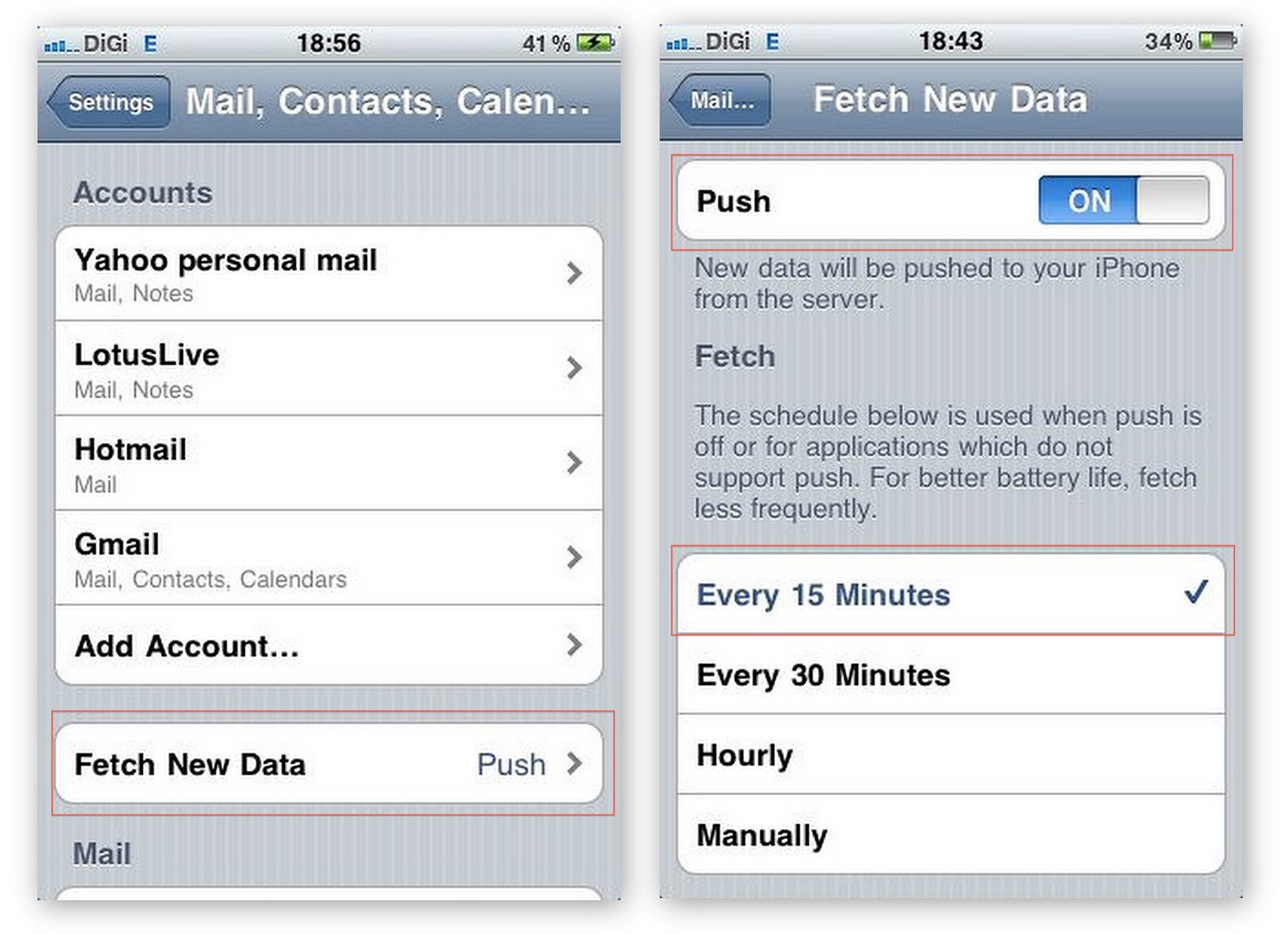
  1. Push Mail

    iPhone would push mail from the server automatically for you so you don't have to. However, when the data signal is weak, iPhone would keep on trying to establish connections with the server for the push mail to happen. This as a result can cause battery drain, as well as pushing the temperature up for the phone.The following are steps to temporarily turn this off, and you can turn it back on when situation improves.

    1. Go to Settings

    2. Mail, Contacts, Calendars

    3. Fetch New Data

    4. Turn push to OFF

    5. Set Fetch to Manually


  2. Ping

  3. Put simply, Ping is Apple's attempt to turn iTune into a social network such as Facebook, or Twitter. Basically, users can see what their friends purchased, liked, and what concerts their friends are going, etc. Now, I don't need this service, and it's sucking the battery life of my phone, so it gotta go!

    To turn this off, do the following:

    1. Go to settings

    2. General

    3. Restrictions

    4. At this point, you may be asked to enter your password if you have enabled it before. Otherwise, IOS will ask you to create a new password to enable it.

    5. Turn PING to OFF


  4. Notification Settings

  5. Some of the applications may try to access the data network to pull for new notifications. Social network applications such as WhatsApp, Facebook, Twitter, etc constantly go online to check if there is any new updates. Usually this would not be a problem, but if your battery is draining like crazy, turn off all the notifications temporarily to see if things improve.

  6. Applications running in the background

  7. Simply kill all running applications in the background to see if things improve.

  8. Others

  9. Address below.


Now, if you have done all the above, and things don't get better, there are still three things that you can do. But please do a full backup before you perform any of the following steps:

  • Check if you have the latest firmware. This can be done by simply connecting your phone to the computer, and launch iTune. Click Check For Update. Update the firmware if there is a new version. I have fixed mine once using this approach.

  • If the above still fails, perform a RESET on the phone. Note: performing this steps WILL NOT erase your personal contents such as email, sms, or contact information. Similar steps are documented here.

  • Only do this if you have absolutely no choice. If you have taken all the above measures and still having this problem, then you may want to do a DFU restore. Before doing this, please make sure you have a FULL BACKUP first because the phone will be completely wiped out! So far I have managed to solve all my battery drainage problems without having to do this. You can follow the instruction at this link here to perform this restore.


Hope this helps, and good luck!

Saturday, May 14, 2011

iPhone Date & Time - Automatic Setting Went Wrong

I occasionally go to Thailand for business trip, in the past I usually had to adjust the clock on my phone to reflect the local time (Thailand is one hour behind Malaysia), and adjusted it again when I am back to Kuala Lumpur.

I still remember the very first time I went to Thailand after I got my brand new iPhone. Shortly after my phone was connected to the roaming network, I noticed the time was set back 1 hour. At first I was pleasantly surprised and at the same time skeptical about this, as I thought I had accidentally set the time without remembering it. But when I checked at my wife's phone (she does not have such habit) it was automatically set to the local time as well!

Being a curious guy, I checked all the setting and found out that iPhone had the ability to automatically set the date and time for me. This is really cool!


When I returned to KL on that trip, I made a mental note to observe if the phone was really so smart and would change the time back to the Malaysian time. And it did!

WOW! This is a a real smart phone! And this feature added to another one of my favorite things about the phone.

Shortly after I upgraded to IOS 4.3.2, I went to Bangkok again for another business trip. The time was changed to local time automatically. All went well and when I returned to KL, and to my horror, the time was still one hour behind! The funny thing was that when I disabled Set Time Automatically, the clock shows KL time again without me having to manually adjust for it.

So I left it as it was. But deep down I was not happy knowing that one of the features in my favorite phone was not working perfectly anymore.

Some of the my friends may remember that I had some real issue with my phone after the upgrades to IOS 4.3.2. Apps were crashing, and phone was getting really dysfunctional.

Before upgrading to IOS 4.3.3, one of the things I did was to reset all settings on my phone. After the reset, I went to the time & date setting to see if this was also reset - and it did. It was reset back to Set Automatically. And you know what? The time is now correctly set.

I guess IOS somehow cached the Thai timezone in its setting somewhere and did not release this.

For those of you who are having this problem, follow the following steps to reset your phone. These steps WILL NOT ERASE your contact information, SMS, EMAILS, etc. You do however need to key in the wireless WEP keys again, and all the remembered networks will be forgotten.

1. Click Settings
2. Scroll down and click General
3. Scroll to the very bottom and select Reset
4. Select RESET All Settings


Oh by the way, my friend Rachel also had an issue with her WhatsApp not being able to connect to the WIFI network on her iPhone. After this steps, the problem was resolved.

Good luck!

Saturday, May 7, 2011

How to stop iTunes and iPhoto from launching unnecessarily

I love my Macbook. I also love my iPhone.

But I hate it when my iPhone connects to my MacBook. For no apparent reasons - Apple thinks that automatically launching iTunes and iPhoto for me would make my life better.

Well, no, it does not! In fact, it annoys the hell out of me. Imagine your car manufacturer decides to start the engine, the massager chair, the radio and the GPS automatically every time you open the door of your vehicle, regardless of the fact that you are only trying to retrieve a document from the car.

So automation does not just make the system smarter. Sometimes it makes it dumber. And the fact that I always have to close whatever that's opened by Snow Leopard just a few seconds later proves the point.

So, if you are as paranoid as me (admit it), and only want your system to act at your command, the following tips might help.

First to stop iTunes from automatically popping up:

1. Connect your iPhone to your Mac
2. Start iTune (oops, I forgot, Apples starts it automatically for you at this point, DUH!)
3. Click at the phone under devices
4. At the summary page of the phone, scroll down to the Options.
5. Uncheck Open iTunes when this phone is connected.

You are done.


So that got rid of half of the annoyance. Now, lets work on the iPhoto part.
1. Connect your iPhone to your Mac
2. Click at spotlight
3. Type Image Capture
4. Select your iPhone under Device
5. Select "No Application" under Connecting this iPhone opens

Done.


And now I am a happy camper! :D

App Crash after IOS 4.3.2


I have been experiencing lots of issues with my iPhone ever since I upgraded to IOS 4.3.2. I mean the app just crashed for no particular reason, and that really annoyed me. It was not only the third party apps that crashed on me, core iPhone applications such as App Store and Safari were also crashing on me.

So I did a check on Google and found out that I was not suffering alone; and a lot of iPhone users who upgraded also suffered the same fate. So I followed the instruction to first reset my network setting, then erase all contents and subsequently restore from iTunes, to hard reset. The phone would work fine for a while and then the apps would just crash again like before.

When the release of IOS 4.3.3 was available on May 4, I was ecstatic that my misery was soon going to end. Did a sync on my iTunes (learned my lesson), and then proceeded to upgrade my phone.

IOS 4.3.3 definitely made the phone more stable, but after a while, apps started crashing again. I could not understand why and finally I thought I should be looking what's going on under the hood myself! So I fired up SYSTEM Lite and found out that I only had 4MB of RAM free! So that's the problem!

A quick switch to process mode and then I found out - for some weird reason, although some of the apps are not showing in my springboard, they were actually running in the background thus consuming those precious precious memory! Launching those running apps in the background and then subsequently killing them freed the much needed memory for me, and boy, my phone was running like new again!

So the bottom line is, if you are on 4.3.2 and cursing your phone as I did, upgrade to 4.3.3. And if you are on 4.3.3 and still suffering the same problem, install SYSTEM Lite (it's free) from iTune and find out what's going on behind the scene. For some reasons some apps were just running by itself (probably due to my pushed notification setting). Terminating some of the unneeded apps would gives you the most precious resources in all computing world - the RAM!

Wednesday, February 9, 2011

再續前緣

時間真的是一種很玄的概念。上中學時,總覺得日子難過。彷彿一瞬間,不惑之年已不再遙遠。

同學們告別校園後,便各奔前程。有的選擇了深造,打工,成家,立業,或走自己的路。同窗之情,也隨著時間,漸漸流失在生活的各種瑣碎當中。而我,也同樣的背著對前途的憧憬,野心,困惑,還有一份從不言敗的驕傲,一筆筆的給自己人生的壁畫,絵上色彩。

時間,就這樣在忙與盲當中流失了。驀然回首,畢業經已20年。

但在我心裡總是有一把聲音,常常我耳邊念念碎。每年大掃除時翻到舊照片,難免會忍不住緬懷一番。這聲音時而如蚊吟,時而洪鐘,時而不聞。它,從來沒有消失過,只是偶爾潛伏著,等待著下一次的突擊。

去年三月的某一天,心中這煩躁又來無端騷擾。終於忍不住了,便在Facebook里輸入了1991年高三文商3,盼望能尋會失散了的同學們。本來也不敢抱著很高的期望,但出乎意料之外,原來瑞強,淑慧,嘉娣,添順已經成立了一個小組。欣喜若狂之際,馬上要求加入。那時心裡七上八下的,擔心他們已忘記了我。畢竟也失聯了那麼久。

驚喜的是,他們不但沒有忘記,還給予我一個很熱誠的歡迎。我也把佩心,慧妮,心怡介紹了進去。

後來不曉得哪位英雄提出要搞一個20年畢業聚會,而且要把它搞大。大家馬上就接受了這個好主意。剛開始時,也只是說說而已,大家也不太認真。當時間越來約靠近時,大家慢慢便活躍起來了。同學們都自動自發的參與:有的要做主持人,攝影師,財政,查賬,安排流程。有的到處去找失散了的同學的通訊方法,有的照著通訊錄一個個的通知,有的找場地,有的報效,有的樂捐。每個同學為了這難得的聚會,都自動自發的不計回報的付出。淑慧與嘉娣還邀請了我們高三時的班主任,Mr. Goh.

我有時想,大家都這麼熱忱,那把在我心中念念碎的聲音,一定也同時活在他們心裡吧?

好不容易的終於熬到了聚會當天。和外家親戚吃了午飯後,便啓程往岜都去了。原本三小時的路程,因為華人新年的關係,再加上柔佛水災,我們用了大約四各多小時才到達。雖然這樣,我和太太還是滿懷喜樂,期待著和老同學們的重聚。

到達了場地之後,有好幾位同學已經到了。緊接著,同學們一位一位的出現了。大家就好像從來沒有分別過的樣子,握手,問候,擁抱,胡扯。之間的互動,是故友式的, 大家都開著只有摯友才能開的玩笑。原本一點點的隔閡,也漸漸的融化了。當我們重播同樂會影片時,雖然音響效果極差,大家還是很興奮的看完,細細的重溫著我們年輕的瘋狂。

回想到當天的聚會,讓我感動的不只是因為我們當晚準備的節目很棒,又或是雖然和家人有約,工作需要,同學們還都盡力的出席。這些都讓我很感動。

更感動的是,雖然分開了已經20年,我們現在又有一個重新去對彼此相知的機會。而當我們在這個殘酷無情的企業化生活里打滾而受傷,感到孤立,無助的時候,同學們的友情20年里都沒有改變。這是多值得慶祝與驕傲的事啊!

對我最愛的朋友和同學們,我要打從心底向你們致謝。謝謝你們給我心中那一把聲音一個交代,也謝謝你們當晚的出席。

最後,謝謝你們給大家一個再續前緣的機會。

Tuesday, February 8, 2011

Together once more

It has been 20 years since we graduated from high school, and most of us have not crossed paths ever since we left school on that fated last day. We ventured into different direction of life with the same degree of enthusiasms, ambitions and confusions. As we bid farewell to each other we armed ourselves with the imaginary invincibility, believing that the world is our oyster.

Then some of us further studied, became professionals, built businesses, started family, or just merely gained weight.

And just like that, 20 years came to pass as if a stone has been dropped into the quiet water, vanished with only the ripples to remind us of its once proud significance.

For me, there is always a little fainted voice in my heart that reminded me of my root, and of my dearest friends and comrades with whom I sit, fought, danced, sang, cried and laughed. Sometimes the little voice became louder, sometimes mute, but it has always been there.

One day last March, the little voice became just a little too irrefutable. So I searched for our class and year in Facebook, not hoping for any result. To my surprise, few of our classmates have set up a page with pictures from their gathering last year. I immediately requested to join the group, not expecting them to remember me.

Instead, they welcomed me with open arms, and I soon added them to my list of friends. I have also recommended a few classmates whom I still have the privilege of keeping in touch with to join the group. The group grew slowly but steadily.

Then someone suggested that we should have a BIG reunion for our 20 years anniversary. The idea was immediately approved of. I guessed, just like me, deep down everyone must have the same little voice.

For a while nothing was being done, and as the deadline was closing in, the momentum was suddenly getting intense. Everyone was volunteering to take part in the organization. Some offered to be the MC, the photographer, the treasurer, the shopper and the list went on. Friends started scouting for suitable places, searching for long lost classmates, compiling phone book, calling everyone on the phone book, and all sort of activities just blossomed like wild mushrooms after the rain. We even invited our form teacher, Mr. Goh, to join us.

Fast forward to the event itself. We started our journey to Batu Pahat after having lunch with Crystal's cousins. It took us a little more than 4 hours to reach our destinations due to the heavy Chinese New Year traffic. Despite the long journey, my wife and I were both in good spirits and were hoping to see old friends again.

And then one by one, they showed up. As if we have not parted at all, we started shaking hands, hugging, joking, laughing and drinking the way that only closed friends could. We simply picked up from where we left off.

Although we prepared some activities and games to get everyone warm-up, they were all redundant. All of us were zoomed in when the video was playing, giggling, laughing and poking each other, and the dusted memories became clear once again.

What touched me was not only the fact that the programs we prepared were amazing (well they were alright), or how everyone chipped in to help, or how everyone showed up despite challenges in their work or with family members. On top of all these, what really touched my heart, when the dusts eventually settled, was that although we have spent the last 20 years apart, we were given a chance to renew our friendship. I now realize that although sometimes I felt abandoned and lonely struggling in the cold, cruel corporate world, our friendship is still how it was 20 years ago, untouched, protected, treasured and now growing.

It is rare and fortunate to have friends like that. I had an accident prior to the reunion dinner and immediately they were offering all sort of helps, without me even asking for them. If these actions do not represent their genuine and caring friendship, I have no idea what does.

To my dearest friends and comrades, you have my deepest gratitudes for your everlasting friendship. Thank you for giving meaning to the little voice in my head, and thank you for making the effort to be with us.

Most important of all, thank you for giving us the opportunity to be together once more.

Sunday, October 3, 2010

SharePoint Can Be Starting Point for BPM, but Not Much More


Read this article at IT Business Edge and the article is reminiscent of what we have gone through recently. I think it is a great read and anyone who intends to implement a SharePoint Project should at least read this first.

SharePoint Can Be Starting Point for BPM, but Not Much More.

Saturday, October 2, 2010

How do you write a functional CRUD application in 3 minutes?

I came across a wonderful framework recently and was totally blown away by it. The simplicity of the framework, totally boast productivity to a new level.

Grails, an open source web application framework, aims to reduce the traditional XML configuration of Enterprise Java Application Development to the minimum. It favors convention over configuration, and to a programmer like me who hates to see another line of XML, Grails is like a God sent. Grails has been designed based on Spring and Hibernate framework, and it can be used to build Enterprise Grade Application.

The following is a simple design principle taken from Wikipedia:

"XML was initially welcomed as it provided greater consistency to configure applications. In recent years however it has become apparent that although XML is great for configuration it can be tedious to set up an environment. This may take away productivity as developers spend time understanding and maintaining framework configuration as the application grows. Adding or changing functionality in applications which use XML configuration adds an extra step to the change process next to writing application code which slows down productivity and may take away the agility of the entire process.

Grails takes away the need to add configuration in XML files. Instead the framework uses a set of rules or conventions while inspecting the code of Grails-based applications. For example, a class name which ends with Controller (for example BookController) is considered a web controller."

Anyway, you can read up the background and theory later if that interest you. My main goal today is to show how easy it is to build a simple Grails application within 3 minutes.

After downloading the latest Grails from their download pagehere, you can proceed with the few simple steps to it up rather quickly.

OK, lets review our objective today:

  • I want to build a simple Application to track what sort of cars my customers drive

  • To achieve that, I will need a simple customer object - with the usual first name, last name, birthday, income group, and the kind of car he drives.

  • As I want to control the sort of cars I have in my database, I will just create a car object. In which you can find all sort of cars in there.

  • I will also create an income group object. That way this parameter can be configurable as well.


  • So all set. Lets start.

    First thing I do is to create a grails application. This can be done by simply issuing the following command. Lets call our application CIS [Customer Information Portal]:
    grails create-app CIS

    You will see a tons of texts flying out from your screen. That means grails is generating the skeleton of the project for you. At the end of it, you will see the following line and then you know your application has been successfully created:
    Created Grails Application at /Users/lys/Test/CIS

    Now, we need to create three domain class. A domain class in Grails is basically a normal Groovy class. We will get into this in another article. From the above objective, we know we need to create three domain classes, namely:
    1. Customer
    2. Car
    3. Income Group

    So lets get to work. We can simply create the domain class by issuing the simple commands:
    1. cd CIS
    2. grails create-domain-class Customer
    3. grails create-domain-class Car
    4. grails create-domain-class IncomeGroup


    If we now navigate to CIS/grails-app/domain/cis, we can see that three files have been generated by Grails:
    1. Customer.groovy
    2. Car.groovy
    3. IncomeGroup.groovy

    Lets go ahead and define our customer object. Say it has the following properties:
    1. First Name
    2. Last Name
    3. Birthday
    4. Car
    5. Income Group

    This is very simple, eh? So lets go ahead and define it in the customer.groovy file:
    package cis

    class Customer {

    String firstName
    String lastName
    Date birthday
    Car vehicleMake
    IncomeGroup annualIncome

    }

    And we will go ahead to define the other two objects. To make things really simple, I am putting income group as a string. You can always make it more complicated to meet your needs:
    package cis

    class Car {

    String manufacturer
    String model
    Integer displacement

    }

    package cis

    class IncomeGroup {

    String annualIncome

    }

    OK. We are done now. And that barely took 1 minutes. Now lets grails do the dirty work. We need to build those objects now. So issue the following commands:
    1. grails generate-all cis.Customer
    2. grails generate-all cis.Car
    3. grails generate-all cis.IncomeGroup


    We are all done by now, and YES, our application is ready to run! Issue this command and see what you got:

    grails run-app cis

    Grails at this point will start up the web server, and your application is served. You can view your application here:
    http://localhost:8080/CIS/


    Great! All our controllers are there. Click at cis.CustomerController, and you will see a simple list where all the customer are supposed to be. Click at create a new customer, and the following screen came up.

    I have taken the liberty to fill up some of the information I have. Since we have not defined any car make and income group yet, I am going to leave it empty.


    Click "Create". Oh No! I cannot create! Grails is telling me that the car make and income group fields are mandatory.


    But wait! I did not even do a single line of coding. All I did was putting in all the properties for each object only.

    Yes, in that 3 minutes we did this, Grails has generated the web front end, the domain class, the database tables, and the Validation logic for you!

    Ok, now lets put in all the correct properties for Income Group and Car and we can get this over with. The following is the final result. All the data are tabulated in a list. The view can be easily changed if we need to; but this is what we have for now:


    Click at the Id, and it brings me to the detail page:


    Click at the Income group, and it brings me to the income group page.


    Not bad for 3 minutes work huh?